
Frequently Asked Questions
General Information
What is SCI BC's Marketplace?
SCI BC’s Marketplace site is a one-stop hub for buying and selling disability related items and finding accessible housing and home support workers. SCI BC’s Marketplace is completely free and by creating a new account you will have access to all of its features and resources.
Creating an Account
As a seller, you must create an account in order to post your ad. As a buyer, creating an account will allow you to save your favourite ads for future viewing.
Your account dashboard will allow you to see all of your ads in one place, edit those ads, mark them as sold, or delete them. As a seller you may post future ads without having to enter your contact information all over again.
Your dashboard also lets you message buyers or sellers, and view past conversations.
Types of Ads
The SCI BC Marketplace offers you 6 different types of ads which you can select during ad posting or reposting. It is not possible to switch between different ad types while the ad is posted. Available types are: Sell, Buy, Free, Rent, Job Offer, Job Wanted.
Each type of ad contains its own unique set of listing details. These details will be available for you to fill out once you select the category you want to post to.
When do ads expire?
All ads are posted for a period of 90 days, or until you mark them as sold. After that time you may relist the ad if you want to.
How do locations work?
For each ad you are able to indicate two types of locations:
One location is the general area in which the job is being posted. You can select from Interior, Kootenay, Metro Vancouver / Fraser Valley, Northern BC, Thompson Okanagan, and Vancouver Island. The second location is the city or town.
How can I contact the seller?
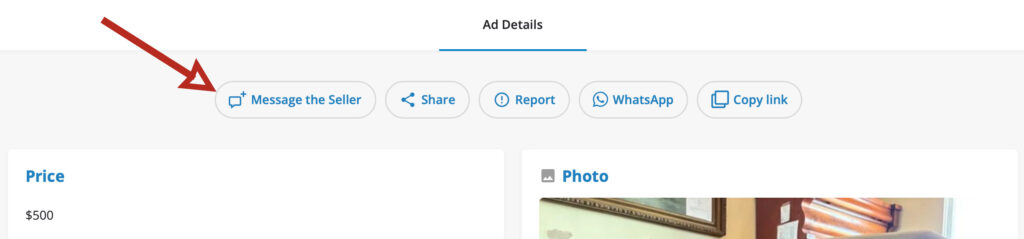
To message the seller about their ad, look for the “Message the Seller” button at the top of the listing. Note that you must have an account and be logged in.
How to report an ad?
If you feel that an ad is breaking some rules, you can report it directly from ad page by clicking on the Report button and writing out the reason you are reporting it. The ad will remain active, however, until an administrator is able to look at it.
Contact Us
Need more information about the Marketplace? Contact SCI BC’s toll-free InfoLine at 1-800-689-2477 or reach out by email at info@sci-bc.ca.
Swap n Shop Ads
Item Pricing
For your item you are able to set a price and whether the price is negotiable (optional). You are free to edit your ad and alter the price of the item as often as you need to.
Accessible Vehicle Ads
Vehicle Pricing
When populating the pricing for a vehicle you are able to set a regular (default) price, a sale price, and whether the price is negotiable.
When you input a sale price, this price is shown in a larger type with a strikethrough your default price. This is useful to let potential buyers know that you have marked down your item. For example, you may wish to edit your ad later to add a sale price, if your item is not selling.
Type of Vehicle
The most common types of vehicles are listed for you to select from. If your vehicle is not listed, please select ‘other’ and indicate the type of vehicle you are selling in your description.
Accessibility Features
When listing a vehicle, please indicate any conversions options. If you need to offer any more details on these features, please be specific in your listing description.
Accessible Housing Ads
Housing Ad Types
When posting a housing ad, you are able to select from two different types – housing for sale, and housing for rent.
Housing Details
Depending on the housing category you select (housing for sale or housing for rent) you will be able to fill in different housing options to help refine your listing. These are things like number of bedrooms, number of bathrooms, accessibility features, square footage, etc. Rental housing will also indicate whether a subsidy is available.
Please be as thorough as you can when writing your ad description. If you wish to post a link to the property on another website, you may do so here.
Home Support Worker Ads
Employment Details
When posting a job please try to fill in as many specific about the position as you can. Providing details on employment type, salary details, distance to public transit, etc will greatly aid in finding a suitable candidate.
Salary Details
When filling out salary information you are able to post a starting salary and maximum salary, as well as whether salary is negotiable. Any additional salary information may be written in the job description.
Safety Tips and Scam Alerts
What does SCI BC do to promote site safety?
We actively review every listing to try to catch any scam postings. We accept and review reports about buyers and sellers and delete accounts for those we feel are using the site inappropriately. We aim to educate users about the potential risks so people can make safe decisions.
How do I know if the equipment is right for me and meets my medical needs?
We recommend talking to your medical care team, especially an Occupational Therapist, to understand your equipment needs. It’s also important to check the equipment to ensure that it is in good condition and will work for you.
What is a suspicious email and what do I do if I receive one?
SCI BC will never request your credit card information or ask for your password by email. Please let us know at info@sci-bc.ca if you receive an email you have concerns about.
How do I contact SCI BC about suspicious activity?
Contact SCI BC at info@sci-bc.ca or call us at 1 800 689-2477 if you have any concerns. Remember to meet in person to exchange equipment, don’t share personal information with someone online, don’t share your banking information and have someone with you when completing a transaction.
What should I do if a seller offers to ship an item or asks for payment before I see it in person?
We recommend seeing the item in person before providing payment.
Someone is insisting on paying me with Bitcoin, PayPal, a cheque or wire-transfer only. Is this normal?
We recommend using cash or doing an e-transfer with auto deposit while with the seller.
Where can I find more information about scams?
The Canadian Anti-Fraud Centre has information about possible scams and how to protect yourself, important for both buyers and sellers.